Email to spreadsheet automation · Ontario
Email to Excel, with a draft you can check.
You copy customer names, dates and job details from emails into Excel. Map those fields into a draft for review. Your sheet connection is scoped before work starts.
Bring a sample email and the sheet you update.
Built for a trucking company: the inbox sorts email, drafts loads for approval and files rate confirmations and delivery receipts onto matched loads. See the trucking build.Your mailbox, sheet columns and review rules are checked before the build is quoted.
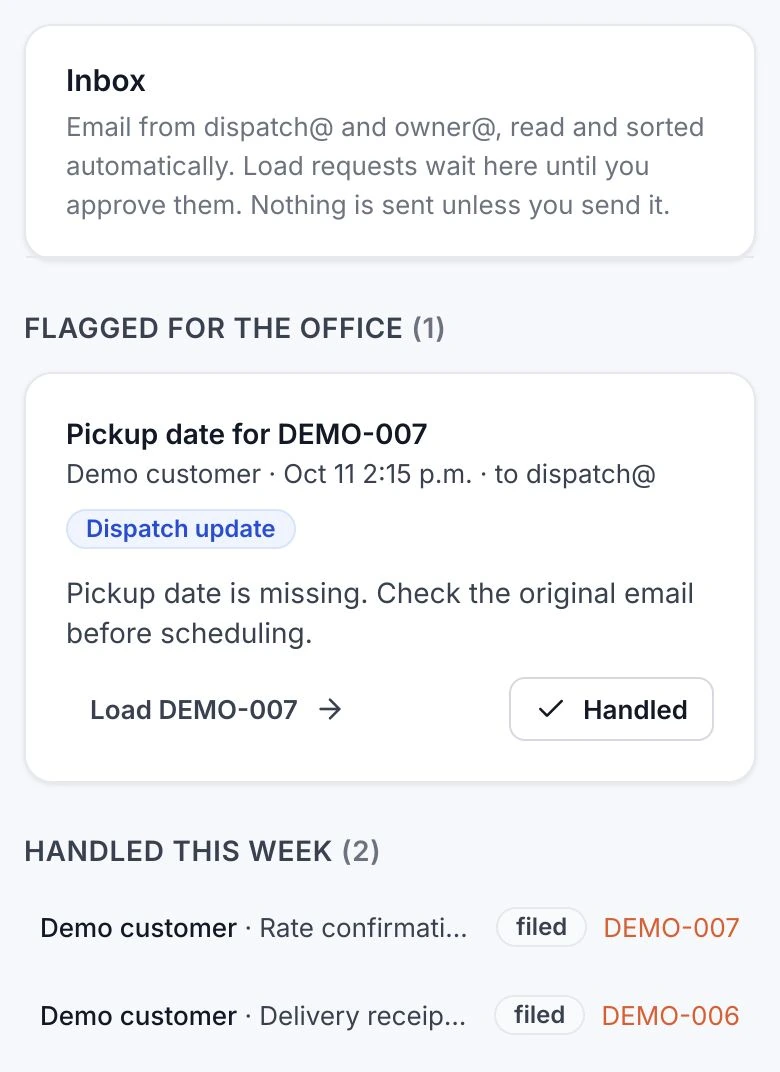
The details in your email have a place in your sheet.
Today, you open the message, find the customer and date, then type them into the next row.
Your scope maps the email details to your columns. A review step catches missing dates or unclear amounts before the row is written.
The request becomes a draft before it becomes a job.
Today, the order, its paperwork and a changed pickup date arrive as separate emails. You read each one to work out where it belongs.
In the trucking build, email is sorted and load requests arrive as drafts. The dispatcher checks the details and approves the load.
Start with one email and the row it needs.
Bring a sample email and the spreadsheet you update to the free 30-minute call. Walk through what you copy and what needs checking.
Your mailbox, sheet and access are checked first. You get a written scope and price to review before work starts.
Before you book
Connecting your mailbox and spreadsheet
Bring the mailbox and spreadsheet tools you use, plus a sample message and row. Their connection options and permissions are checked first. Your fields, destination and review rules go into the written scope.
What the trucking build proves
Its live inbox sorts email, drafts loads for approval and files rate confirmations and delivery receipts onto matched loads. Your email-to-spreadsheet connection needs its own scope.
Email bodies and attachments
The trucking build can read email text and supported PDF or image attachments. Bring examples of your messages and files. Their formats and the details to extract are checked before the build is quoted.
Missing details and approval
In the trucking build, drafts show the extracted details and source email preview. Staff edit the draft before approving the load. Your scope defines which details require review and who can approve a row.
Replies, duplicates and changes to a row
A new request and an update to an existing job need different rules. Your scope agrees how to identify each record, handle repeat messages and review changes. Those rules are tested with sample emails before launch.
Your data and ongoing care
Your customer data stays yours. Mailbox access, hosting and ownership terms go into your quote. Ongoing care of the delivered connection is agreed separately in writing.
Bring the email you copied into a row.
Walk through your email-to-spreadsheet handoff on a free 30-minute call. You leave with a written scope and price to review.
No commitment until you approve the scope.