Quote follow-up automation · Ontario
Quote follow-up automation, on a schedule you approve.
You sent the quote. Then you have to remember who to chase and when. Set up timed follow-up with messages and stop rules you approve.
Bring a quote and the follow-up you send by hand.
Built for a trucking company: approve a saved quote, choose the recipient and email it from the quote workspace. See the trucking build.Your follow-up timing, messages and stop rules go into your own build scope.
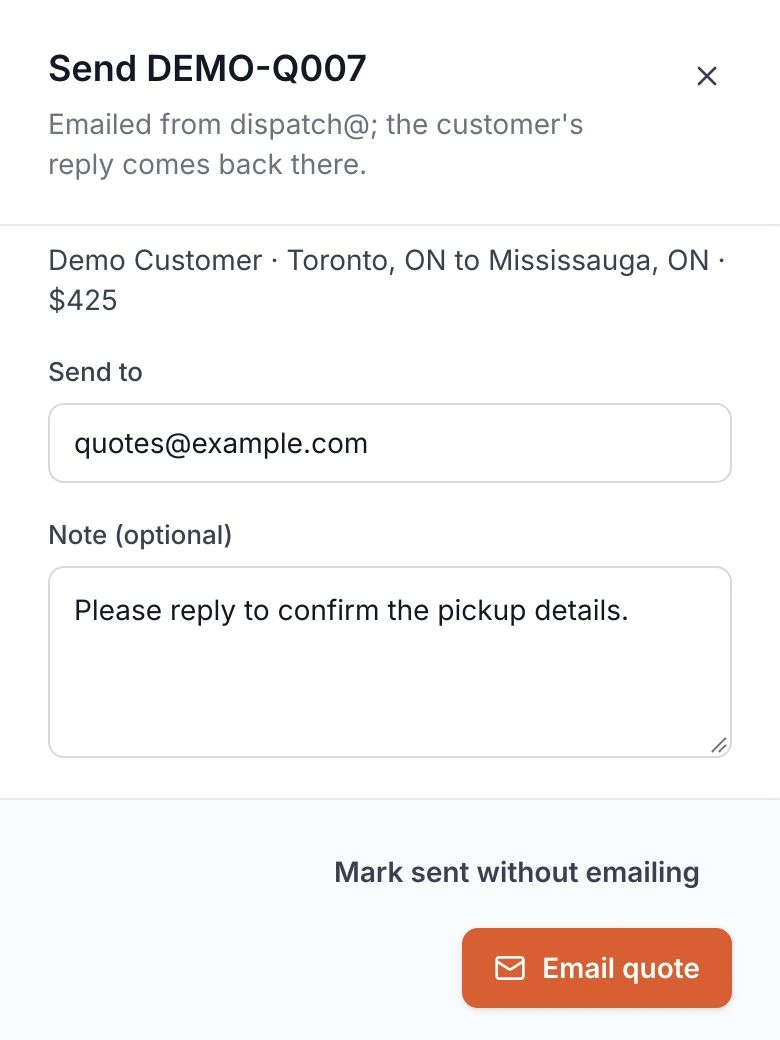
The quote goes out with a follow-up date.
Today, you search your sent folder to find the quotes that went quiet. The next message depends on you remembering to send it.
Your build schedules follow-up from the quote's sent date. You choose the gap between messages and the maximum number to send.
A reply changes what happens next.
Today, you check the email thread before chasing a quote. Someone may have replied, accepted it or asked you to stop.
Your build pauses follow-up when a reply arrives and routes it to the right person. You agree how quote decisions end the sequence.
Start with one quote and your next message.
Bring a quote and the follow-up you send by hand to a free 30-minute call. Walk through when you send it and what changes the next step.
Your quoting tool and mailbox are checked first. You get a written scope and price to review before work starts.
Before you book
Connecting your quotes and mailbox
Bring the tools you use to price jobs and send quotes. Their connection options and permissions are checked first. Your build connects the quote record, sent date and reply thread under an agreed scope.
Choosing the messages and timing
You approve the message text, send times and maximum number of follow-ups. Your build uses the agreed quote details in each message. Changes to price or scope go back to a person.
Replies and quote decisions
Your build pauses the sequence when a reply arrives and gives the conversation to the agreed person. Your scope defines how acceptance, refusal, expiry and stop requests end follow-up. Those rules are tested with sample quotes.
What the product screen shows
It shows the quote workspace built for a trucking company, using invented demo data. A person approves the quote before opening the email screen. Follow-up timing and reply handling are configured for your own tools.
Contacts and permission to follow up
Your scope defines which contacts may receive follow-up and how stop requests are recorded. Sending limits and permission checks are agreed before automation is enabled. Bring your current customer contact rules to the call.
Testing and ongoing care
Sample quotes test the timing, reply handling and stop rules before launch. Your customer data stays yours. Hosting, ownership and ongoing care of the delivered workflow are agreed in writing.
Bring the quote you keep meaning to chase.
Walk through your quote follow-up on a free 30-minute call. You leave with a written scope and price to review.
No commitment until you approve the scope.